In today’s fast-paced digital world, cloud storage has become a game-changer for individuals and businesses alike. It offers unmatched convenience, security, and scalability—transforming how we save, access, and share data from anywhere in the world.

What Is Cloud Storage and How Does It Work?

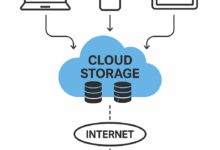
Cloud storage is a revolutionary technology that allows users to store data on remote servers accessed via the internet. Instead of saving files on a local hard drive or physical device, data is uploaded to data centers managed by cloud service providers. These centers are equipped with advanced infrastructure to ensure high availability, redundancy, and security.
Understanding the Basic Mechanism
When you upload a file to the cloud, it doesn’t just go to a single server. The system breaks your data into smaller chunks, encrypts them, and distributes them across multiple servers in different geographic locations. This process, known as data replication, ensures that even if one server fails, your data remains safe and accessible.
- Data is encrypted both in transit and at rest.
- Files are stored redundantly across multiple data centers.
- Users access files via web interfaces or dedicated apps.
For example, when you save a photo to Google Drive, it’s not just sitting on one machine in California. It might be mirrored in data centers in Europe and Asia simultaneously, ensuring rapid access and disaster recovery. This distributed architecture is what makes cloud storage so resilient.
Different Types of Cloud Storage Models
There are three primary models of cloud storage: public, private, and hybrid. Each serves different needs based on security, control, and scalability requirements.
- Public Cloud: Services like Amazon S3, Microsoft Azure, and Google Cloud Storage offer shared infrastructure. They are cost-effective and scalable but may raise concerns for highly sensitive data.
- Private Cloud: Dedicated infrastructure used exclusively by one organization. Ideal for industries like healthcare and finance that require strict compliance (e.g., HIPAA, GDPR).
- Hybrid Cloud: Combines public and private clouds, allowing data and applications to move between them. Offers flexibility and optimized costs.
According to IBM, hybrid models are becoming increasingly popular as businesses seek to balance performance, security, and cost.
Key Players in the Cloud Storage Industry
The global cloud storage market is dominated by tech giants who have invested heavily in data center infrastructure and innovation. The top providers include:
- Amazon Web Services (AWS): The market leader with Amazon S3 offering scalable object storage.
- Microsoft Azure: Strong integration with Windows environments and enterprise tools.
- Google Cloud Platform (GCP): Known for AI/ML integrations and high-performance computing.
- Dropbox and Box: Focused on user-friendly collaboration and file-sharing features.
These companies continuously innovate, offering tiered storage options, intelligent data management, and edge computing capabilities. Their competition drives better pricing, improved security, and enhanced user experiences.
Top 7 Benefits of Using Cloud Storage
Adopting cloud storage brings a wealth of advantages that go beyond simple file backup. From cost savings to global accessibility, the benefits are transforming how organizations operate and individuals manage their digital lives.
1. Unmatched Accessibility and Mobility
One of the most powerful benefits of cloud storage is the ability to access your files from any device, anywhere in the world. Whether you’re on a laptop in New York, a tablet in Tokyo, or a smartphone in Sydney, your data is just a login away.
- Access files on smartphones, tablets, desktops, and smart TVs.
- Real-time syncing ensures all devices show the latest version.
- Perfect for remote teams and digital nomads.
This level of mobility has been a catalyst for the rise of remote work. A Gartner report noted that cloud adoption accelerated by nearly three years due to the pandemic, largely because of its accessibility.
2. Cost Efficiency and Scalability
Traditional storage solutions require significant upfront investment in hardware, maintenance, and IT staff. Cloud storage operates on a pay-as-you-go model, eliminating capital expenses and allowing businesses to scale up or down based on demand.
- No need to purchase expensive servers or storage arrays.
- Pay only for the storage you use.
- Scale instantly during peak periods (e.g., holiday sales, product launches).
For startups and SMEs, this is a game-changer. Instead of spending $50,000 on servers, a company can start with a $10/month plan and grow organically. This flexibility supports innovation without financial strain.
3. Enhanced Data Security and Compliance
Contrary to popular belief, reputable cloud storage providers often offer better security than on-premises solutions. They employ advanced encryption, multi-factor authentication, intrusion detection systems, and regular security audits.
- End-to-end encryption protects data from breaches.
- Automatic backups prevent data loss from human error or ransomware.
- Compliance with standards like GDPR, HIPAA, and SOC 2.
For instance, AWS provides tools like AWS Key Management Service (KMS) to manage encryption keys, giving organizations granular control over data access. As AWS Security highlights, their infrastructure is designed to meet the strictest regulatory requirements.
4. Automatic Backup and Disaster Recovery
Data loss can be catastrophic—whether from hardware failure, cyberattacks, or natural disasters. Cloud storage automatically backs up your data, ensuring business continuity.
- Versioning allows rollback to previous file states.
- Geographic redundancy protects against regional outages.
- RTO (Recovery Time Objective) and RPO (Recovery Point Objective) are minimized.
Imagine a hurricane knocks out your office servers. With cloud storage, employees can log in from home and continue working seamlessly. This resilience is why 94% of businesses report improved security after moving to the cloud, according to a survey by Accenture.
5. Seamless Collaboration and File Sharing
Cloud storage platforms like Google Drive, Dropbox, and OneDrive enable real-time collaboration. Multiple users can edit documents, spreadsheets, or presentations simultaneously, with changes reflected instantly.
- Commenting, tagging, and task assignment features streamline teamwork.
- Secure sharing via links with expiration dates and password protection.
- Integration with productivity suites (e.g., Google Workspace, Microsoft 365).
This has transformed project management. Teams no longer waste time emailing attachments back and forth. Instead, they work on a single source of truth, reducing errors and boosting productivity.
6. Environmental Sustainability
While not always discussed, cloud storage contributes to environmental sustainability. Large providers optimize energy efficiency across massive data centers, reducing the carbon footprint per gigabyte stored.
- Data centers use renewable energy sources (e.g., Google’s 24/7 carbon-free energy goal).
- Server virtualization reduces hardware waste.
- Efficient cooling and power management systems lower energy consumption.
Google claims it has been carbon-neutral since 2007 and aims to run entirely on carbon-free energy by 2030. By consolidating storage needs in eco-efficient facilities, cloud storage helps reduce the global IT carbon footprint.
7. Integration with Emerging Technologies
Cloud storage isn’t just a passive repository—it’s a foundation for innovation. It integrates seamlessly with AI, machine learning, big data analytics, and the Internet of Things (IoT).
- AI-powered search can find images by content (e.g., “show me photos with dogs”).
- IoT devices stream sensor data directly to the cloud for real-time analysis.
- Big data platforms process petabytes of stored information for insights.
For example, Tesla uses cloud storage to collect driving data from thousands of vehicles, which is then analyzed to improve autonomous driving algorithms. This synergy between storage and intelligence is shaping the future of technology.
Common Use Cases of Cloud Storage Across Industries
Cloud storage is not just for tech companies. Its versatility makes it valuable across a wide range of sectors, each leveraging it in unique ways to solve real-world problems.
Healthcare: Secure Patient Data Management
In healthcare, protecting patient records is critical. Cloud storage enables hospitals and clinics to store electronic health records (EHRs) securely while ensuring authorized access from any location.
- Encrypted storage complies with HIPAA regulations.
- Doctors can access patient history during emergencies, even off-site.
- AI tools analyze medical images stored in the cloud for faster diagnosis.
For example, the Mayo Clinic uses Google Cloud to store and analyze genomic data, accelerating research and personalized medicine.
Education: Remote Learning and Digital Classrooms
Educational institutions use cloud storage to host lectures, assignments, and student projects. Platforms like Google Classroom and Microsoft Teams rely on cloud infrastructure to deliver content globally.
- Students upload homework and receive feedback online.
- Teachers share resources without worrying about storage limits.
- Entire libraries are digitized and made accessible remotely.
During the pandemic, universities like Harvard and Stanford migrated to cloud-based systems to ensure uninterrupted learning, proving its reliability under pressure.
Media and Entertainment: Streaming and Content Distribution
Streaming giants like Netflix, Disney+, and Spotify depend on cloud storage to deliver high-quality content to millions of users simultaneously.
- Video files are stored in scalable object storage (e.g., AWS S3).
- Content Delivery Networks (CDNs) cache data closer to users for faster streaming.
- AI recommends content based on viewing habits and stored preferences.
Netflix, for instance, uses AWS to manage over 100 petabytes of video data, ensuring smooth playback across devices and regions.
Security Concerns and How to Mitigate Them
Despite its many advantages, cloud storage is not without risks. Security remains a top concern for organizations considering migration. However, most threats can be mitigated with proper strategies and tools.
Data Breaches and Unauthorized Access
One of the biggest fears is that hackers could gain access to sensitive data stored in the cloud. While high-profile breaches make headlines, they are often due to misconfigurations or weak user practices, not flaws in the cloud itself.
- Use strong, unique passwords and enable multi-factor authentication (MFA).
- Regularly audit access logs and permissions.
- Encrypt sensitive files before uploading (client-side encryption).
A 2020 report by McAfee found that 20% of cloud storage folders in enterprises were misconfigured and exposed to the public. Proper training and automated security tools can prevent such oversights.
Insider Threats and Employee Misuse
Not all threats come from outside. Employees with access can accidentally or intentionally leak data. This is especially risky in organizations without strict access controls.
- Implement role-based access control (RBAC).
- Monitor user activity with security information and event management (SIEM) tools.
- Conduct regular security awareness training.
“The human element is often the weakest link in cloud security.” — Cybersecurity Expert, NIST
By combining technical controls with employee education, organizations can significantly reduce insider risks.
Vendor Lock-In and Data Portability
Another concern is becoming too dependent on a single provider. Migrating large datasets between platforms can be time-consuming and expensive.
- Use open standards and APIs whenever possible.
- Regularly export and back up data in standard formats (e.g., JSON, CSV).
- Adopt multi-cloud strategies to avoid over-reliance on one vendor.
Tools like Rclone and CloudBerry allow users to transfer data between providers, enhancing flexibility and reducing lock-in risks.
Choosing the Right Cloud Storage Provider
With so many options available, selecting the right cloud storage provider can be overwhelming. The decision should be based on specific needs, budget, and long-term goals.
Key Factors to Consider
Before committing to a provider, evaluate the following criteria:
- Security Features: Look for end-to-end encryption, MFA, and compliance certifications.
- Performance: Check latency, uptime guarantees (SLA), and data transfer speeds.
- Scalability: Ensure the service can grow with your needs.
- Support: 24/7 customer support and responsive help desks are crucial.
- Pricing: Compare plans, watch for hidden fees (e.g., egress charges).
For example, AWS offers a free tier for beginners, while Backblaze is known for its flat-rate pricing with no egress fees—ideal for media companies that frequently download large files.
Free vs. Paid Cloud Storage: What’s the Difference?
Many providers offer free plans with limited storage (e.g., Google Drive’s 15 GB). These are great for personal use but come with trade-offs.
- Free Plans: Limited storage, fewer security features, ads, and lower support priority.
- Paid Plans: More storage, advanced security, priority support, and business features (e.g., team management).
For businesses, paid plans are almost always worth the investment. The cost of downtime or data loss far exceeds monthly subscription fees.
Top Providers Compared: AWS, Google, Microsoft, Dropbox
Here’s a quick comparison of the leading cloud storage services:
- AWS S3: Best for developers and enterprises needing high scalability and integration with other AWS services.
- Google Drive: Excellent for collaboration and Google Workspace users; intuitive interface.
- Microsoft OneDrive: Deep integration with Windows and Office 365; ideal for corporate environments.
- Dropbox: User-friendly, strong file-syncing, and collaboration tools; great for small teams.
Each has strengths depending on your ecosystem. Choosing the right one often comes down to which tools you already use.
Future Trends in Cloud Storage Technology
The cloud storage landscape is evolving rapidly. Emerging technologies and changing user demands are shaping the next generation of storage solutions.
Edge Computing and Decentralized Storage
As IoT devices multiply, sending all data to centralized cloud servers creates latency and bandwidth issues. Edge computing processes data closer to the source, reducing load on the cloud.
- Sensors in smart factories analyze data locally before sending summaries to the cloud.
- Decentralized storage networks like IPFS and Filecoin use blockchain to distribute data across peer-to-peer nodes.
- Improves speed, reduces costs, and enhances privacy.
This shift will make cloud storage more efficient and resilient, especially for real-time applications like autonomous vehicles and augmented reality.
AI-Driven Data Management
Artificial intelligence is being used to optimize storage automatically. AI can predict usage patterns, archive inactive data, and detect anomalies.
- Smart tiering moves cold data to cheaper storage (e.g., AWS Glacier).
- AI identifies duplicate files and suggests deletions.
- Predictive analytics forecast storage needs, preventing over-provisioning.
Google’s AI-powered storage system already reduces energy use by optimizing cooling and workload distribution in data centers.
Quantum Computing and Encryption Challenges
While still in early stages, quantum computing poses a future threat to current encryption methods. Quantum computers could potentially break RSA and AES encryption, putting stored data at risk.
- Researchers are developing quantum-resistant algorithms (e.g., lattice-based cryptography).
- Cloud providers are preparing for post-quantum encryption transitions.
- Organizations should stay informed and plan for future upgrades.
The National Institute of Standards and Technology (NIST) is leading efforts to standardize quantum-safe cryptography, ensuring cloud storage remains secure in the coming decades.
Best Practices for Maximizing Cloud Storage Efficiency
Simply using cloud storage isn’t enough. To get the most value, follow these best practices to enhance performance, security, and cost-effectiveness.
Organize Files with a Clear Structure
A well-organized cloud storage system saves time and reduces errors. Use consistent naming conventions, folders, and tags.
- Create a hierarchy: Department > Project > Year > Subfolder.
- Use descriptive file names (e.g., “Q3_Sales_Report_2024_Final.pdf”).
- Apply metadata and tags for easy searchability.
This makes collaboration smoother and ensures new team members can find what they need quickly.
Enable Version Control and File Locking
Versioning prevents accidental overwrites and allows recovery of previous file states. File locking stops multiple users from editing the same document simultaneously.
- Google Drive keeps revision history for 30 days (longer on paid plans).
- Dropbox allows restoring files up to 180 days.
- Set policies for automatic version retention.
These features are essential for legal, financial, and creative teams where document accuracy is critical.
Monitor Usage and Optimize Costs
Cloud costs can spiral if not monitored. Use built-in tools to track storage usage, data transfer, and user activity.
- Set alerts for unusual spikes in usage.
- Delete redundant, obsolete, or trivial (ROT) data regularly.
- Use lifecycle policies to auto-archive old files.
For example, AWS Cost Explorer helps visualize spending patterns, while Google Cloud’s Recommender suggests optimizations.
What is cloud storage?
Cloud storage is a service that allows users to save data on remote servers accessed via the internet. It enables secure, scalable, and accessible data storage without relying on local hardware.
Is cloud storage safe?
Yes, reputable cloud storage providers use advanced encryption, access controls, and compliance standards to protect data. However, users must also follow best practices like using strong passwords and enabling two-factor authentication.
How much does cloud storage cost?
Costs vary by provider and plan. Free tiers offer limited storage (e.g., 5–15 GB), while paid plans range from $2–$10/month for individuals and more for enterprise solutions based on usage.
Can I access my cloud storage offline?
Some services allow offline access by syncing files to your device. Once synced, you can view and edit files without an internet connection, and changes will upload when you reconnect.
What happens if the cloud provider goes out of business?
Reputable providers have data portability options and long-term commitments. Always maintain backups and avoid vendor lock-in by using standard formats and multi-cloud strategies.
Cloud storage has evolved from a niche technology to a cornerstone of modern digital life. Its benefits—ranging from cost savings and global accessibility to enhanced security and innovation—are too significant to ignore. As technology advances, cloud storage will continue to integrate with AI, edge computing, and quantum-safe encryption, shaping a smarter, more connected future. Whether you’re an individual managing personal files or a multinational corporation handling petabytes of data, adopting cloud storage with best practices ensures efficiency, resilience, and peace of mind.
Further Reading:
